Buying a car
Lane Keep Assist: What It Does and What to Check Before Buying
Separate lane keep assist, departure warning and lane centering. Verify actual equipment, operating limits and repair records before valuing a used car’s features.
Published
Sources checked . How this guide is prepared.
START HERE
The short answer
Lane keep assist is a driver-assistance feature that can intervene when a vehicle is unintentionally leaving its lane. It is different from a warning-only system and from continuous lane-centering assistance. Confirm what the actual car has, how its manufacturer describes operation and what limitations apply before making the feature part of your buying decision.
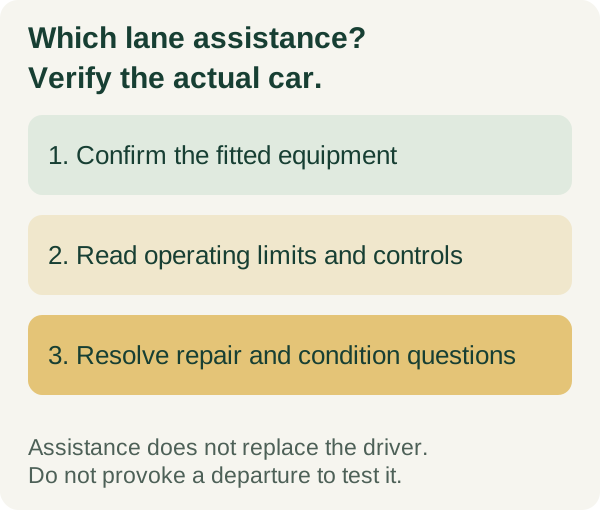
A menu item, steering-wheel icon or model-family advertisement is not enough to establish the equipment or its current condition. Match the feature to the particular VIN and read the correct owner manual. Keep driving responsibility with the driver and follow the manufacturer’s instructions.
Lane keep assist versus lane departure warning and lane centering
NHTSA’s driver-assistance guide separates three functions. Lane departure warning alerts the driver to an unintended departure. Lane keeping assistance can intervene to help prevent that departure. Lane centering assistance provides ongoing inputs intended to help keep the car near the center of its lane.
Those descriptions explain the categories, not identical behavior across every car. Manufacturers use different names and implementations. A listing that says lane assist may leave it unclear whether the car warns, intervenes briefly or offers another function entirely.
Ask which feature is installed, what the manufacturer calls it and where the relevant operating instructions appear. Do not assume a lane feature also supplies adaptive cruise control, automated lane changes or any particular level of hands-free operation.
A manufacturer example shows why the details matter
Chevrolet’s Lane Keep Assist guidance describes brief steering input with possible departure alerts, not continuous steering. Its operating speed and availability vary by vehicle, and it directs owners to the manual and actual equipment list.
The same guidance explains that intentional lane changes and system state can affect whether it intervenes. Do not use the absence of an alert during one ordinary maneuver as proof that the system is broken. Equally, do not assume a visible icon proves that every function is ready and working in every condition.
This is a Chevrolet example, not a specification for all lane-keeping systems. Read the actual car’s instructions for lane detection, operating conditions, driver input, alerts and any limitations. Resolve unclear wording with the manufacturer or a qualified representative rather than borrowing another vehicle’s settings.
Verify the equipment on the actual used car
Request the VIN-specific equipment information and match the model year, trim and option package. A higher trim name or a familiar button can be a clue, but it does not complete the identification.
Use the make-and-model guide to keep configuration details separate. Two cars with the same model name can differ in fitted equipment, particularly across years or optional packages. If the feature is essential to your choice, obtain confirmation before traveling or leaving a deposit.
Record both the advertised claim and the evidence supporting it. An answer such as “the model usually has it” should remain unresolved until someone establishes what is fitted to this car.
Learn the controls without conducting a risky test
Have the seller or an appropriately qualified representative explain the relevant controls, indicators and settings while safely parked. Read the manual before the drive, including what the feature does not do and when the driver must take action.
Use an ordinary lawful test drive to assess comfort with the car. Do not deliberately drift out of a lane, release control, aim toward another vehicle or try to defeat an alert to prove that assistance works. A buying appointment is not a controlled safety-technology test.
If a warning or behavior raises a concern, record the conditions and have a qualified shop investigate. Stop the drive if the vehicle seems unsafe. A short drive cannot establish system performance in every road, weather or traffic condition.
Ask about glass, body and related repair history
Ask whether the car has had windshield, camera, sensor, steering, suspension or collision work relevant to its fitted system. Request the available invoices and any applicable inspection or calibration records.
Have a qualified shop determine what the manufacturer requires for the actual car and work performed. Do not assume every repair requires the same procedure or that a statement saying “no warning lights” proves all required work was completed.
If collision history is part of the concern, use the car frame-damage buying guide to organize the structural and repair-record questions separately. A feature operating normally during one drive does not certify the underlying repair, and a history report does not confirm the condition of every assistance component.
An original two-listing equipment check
Imagine two otherwise suitable listings. Car A advertises lane assist without identifying the option or showing supporting equipment information. Car B has confirmed lane-keeping equipment, but a windshield-replacement invoice leaves a follow-up question about the applicable procedure. These are invented examples, not actual inventory.
For A, resolve the equipment identity before valuing the feature. For B, have the responsible shop or qualified inspector resolve the repair-record question. Neither car wins merely because one advertisement sounds more advanced or one screen displays a reassuring icon.
Keep the results in three groups: confirmed equipment, documented operating limitations and unresolved condition questions. That record is more useful than treating every lane-assistance label as the same purchase benefit.
Choose the feature for your use, alongside the rest of the car
Consider whether you understand the alerts and controls and feel comfortable using the system as instructed. Check the car’s seating position, visibility and ordinary road behavior as well. Assistance should complement a suitable car rather than compensate for a layout or condition problem you cannot accept.
Arrange an independent pre-purchase inspection and agree on what it can evaluate. Ask specifically whether an assistance-system concern needs specialist assessment beyond the standard scope. No general inspection or equipment list promises that a crash will be prevented.
Compare the complete purchase price, condition and ownership needs after the essential questions are answered. This guide supplies no universal dollar premium for lane keep assist or guarantee that one implementation will suit every driver.
Download the lane-assistance buying worksheet
The blank lane keep assist verification worksheet has sixteen prompts for equipment identity, operating instructions, settings, repair evidence, inspection scope and unresolved questions. Use one copy per car to compare the same evidence.
Choose with a clear understanding of what is installed and what remains unverified. If the seller cannot establish a feature that is essential to your decision, keep that requirement open while considering other cars. Do not turn a technology name into a promise about the actual vehicle.
Source check: November 19, 2026. This is a source-based buying guide, not an instrumented lane-assistance test or a finding that a particular car’s system is functional.
BEFORE YOU TAKE THE NEXT STEP
Practical checklist
Check the VIN, ownership record and seller details.
Arrange an independent inspection and review the written terms.
Confirm the total cost and title-transfer process before paying.
CHECK THE DETAILS
Sources and further reading
Follow the source linked beside a claim for its context. For a transaction, confirm current requirements with the relevant agency, lender or provider.
- NHTSA’s driver-assistance guidenhtsa.gov
- Chevrolet’s Lane Keep Assist guidancechevrolet.com
YOUR NEXT READ